
In this tutorial, we will walk you through the process of discovering winning Breakout trading strategies with FxMagnetic™ Breakout Trader effectively.
You’ll learn essential setup steps, from platform configuration to strategy optimization, and understand how to implement profitable breakout – based trading strategies using multiple trading modes and configurations.
This guide breaks down the process into manageable steps: software setup, strategy building, optimization techniques, and auto trader implementation. We’ll also cover crucial aspects of strategy monitoring and portfolio management to help you stay on track.
We created this to help both new and experienced FxMagnetic users effectively utilize FxMagnetic Breakout’s features and develop profitable trading strategies.
Initial Setup Checklist
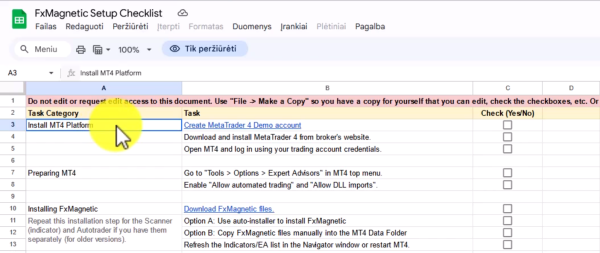
Before beginning any strategy development, access the setup checklist from the download center in your course access section. This document guides the entire setup and optimization process.
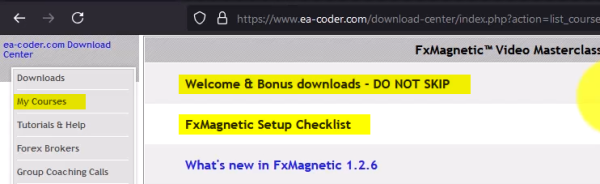
To Access Download Center
- Log into your account
- Click Access Course
- Locate Setup Checklist document
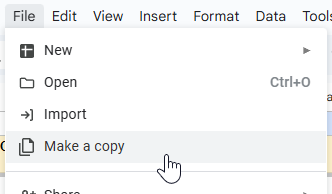
- Upon opening the document, click File > Make A Copy
- Save the copy in your own Google Drive
- Use this checklist as your guide as you progress
Important Note: Don’t skip the welcome and bonus downloads section. All promised bonuses and additional resources are available there.
Downloading And Installing FxMagnetic Software
The installation process for any FxMagnetic Software (i.e: Candlestick, RSI, BB, MACD, etc.) is similar. You can read more about it here.
Preparing Historical Data
Sufficient historical data is essential for accurate backtesting and strategy optimization. Without this, the potential of the software and backtesting results will be limited, and we don’t want that.

Chart Preparation
- Open desired trading pair chart.
- Select preferred time frame.
- Turn off auto scroll.
- Press and hold the Home key on your keyboard.
- Wait for data to load to the earliest available date while pressing on the Home button. Doing this action ensures all the historical data is loaded on the chart.
- Once done, re-enable auto scroll.
Pro Tip: Zoom out the chart for faster data loading.
Breakout Scanner Setup
Before starting, ensure the Breakout Scanner is properly installed in your MT4 platform:

Initial Software Configuration
- Find Breakout Scanner in the Navigator window under Indicators in the MT4 platform.
- To access, click on View > Navigator
- Double-click or drag the indicator to chart
- Input license key
- For starters, we suggest you choose regular strategy
Understanding FxMagnetic™ Breakout Trader Strategies
Breakout Trader strategies use Breakout logic to enter when price decisively moves beyond a defined level of support, resistance, or a volatility-derived boundary, expecting follow-through in the breakout direction. They rely on lookback periods (for levels or channels), volatility filters like ATR or band multipliers, and confirmation rules (for example, close beyond the level) with stop and target rules often sized by ATR or fixed reward-to-risk ratios.

Available Strategies:
- New York Opening Range Breakout (range minutes adjustable, starts at New York open 9:30 AM New York time)
- Custom opening range breakout (user-defined session start time, range minutes adjustable)
- London Breakout (pre-range minutes used to build range before London open 8:00 AM London time)
- Custom pre-session breakout (user-defined session start time, pre-range minutes adjustable)
Trading Modes Explained
Regular Mode:
- Takes both buy and sell trades
- Closes existing trades when opposite signals appear
- Only one trade opens at a time
Reverse Mode:
- Takes opposite trades from strategy signals
- Useful for contrarian approaches
Buy Only/Sell Only:
- Trades only in one direction
- Holds until stop loss or take profit
Building Your First Trading Strategies
This software gives you the freedom to try hundreds of different settings. However, to get you started in the right direction, here is an example setting you can try.

Basic Setup
- We suggest you start out with the New York opening range breakout (regular) first.
- For **SL/TP Type,choose ATR 14 which is the dynamic version.
- For additional Trade Filter, choose Daily time filter.
- Click OK once these are selected.
- This will take you to your chart where you will see this small panel.
Set the following Parameter Ranges ():
You can see more sample settings in this cheat sheet.
Understand that this is just the initial step. You are most likely to find better settings that fit your trading style and are far profitable after you optimize.
Keep in mind: Higher timeframes = Less signals but reliable. Lower timeframe = More signals but less reliable. The key is finding a timeframe that fits your trading style and gives you winning results.
Optimizing Your Strategy
The software will test different values within the parameter range to find one with the best result. Approximately, it will run 3,000 simulations depending on your settings, and takes around 10 to 30 minutes depending on your computer.

Preparation
- Close unnecessary charts to improve processing speed. If possible, close other programs running on your computer too.
- Typical duration is 10 to 30 minutes depending on the computer’s power (hence closing other charts or programs).
- The software runs approximately 3,000 or more depending on your settings.
- Set optimization parameters.
Review The Results (Important!)
The values seen on your chart after the optimization provides an overview of how the strategy’s parameters performed. This alone could help you decide how you will move forward.

To access the records:
- Navigate to File > Open Data Folder > MQL4 > Files
- Open FX Magnetic Breakout Scanner Optimization Results folder
- Open the most recent CSV file
- Use filtering to analyze results:
- Filter by Signal Count (minimum 50)
- Sort by Return to Drawdown Ratio
- Review top strategies for viability
Key Metrics to Evaluate:
- Check win rate (Example: aim for 50% win rate or higher for strategies with Risk/Reward of 2).
- Evaluate total profit
- Assess drawdown levels
- Review return-to-drawdown ratio (I recommend aiming for 10 and higher)
- Examine trade frequency (example: 1.9 signals per week)
Applying Strategy Templates

Using CSV Results:
- This is where the magic starts. You can get this via the Export Signals CSV
- Identify the strategy parameters from your optimization results
- Note: Symbol, timeframe, strategy type, trade filters
- Configure Flow Scanner with exact parameters:
- Stop loss and take profit multipliers
- Moving average periods
- Trade filter settings
- Spread configuration
Parameter Application:
- Ensure all settings match exactly: pair, timeframe, strategy mode
- Include spread settings for realistic results
- Verify trade filter parameters and timeframes match
Auto Trader Configuration
Breakout Autotrader use with Breakout Scanner allows you to unleash the automation capability of FxMagnetic, enabling you to speed up your progress in developing a working trading strategy.
Basic Setup
- Locate Breakout Autotrader in Expert Advisors list under Navigator
- Drag to the same chart where your Breakout Scanner is attached
- Input license key.
- Select indicator sync mode (recommended default)
- Manually set a unique magic number for strategy identification (example: 1777, 10, 125, etc.)
Risk Management Settings
- For Money Management Mode, we highly suggest you choose Risk Per Trade (%).
- Set risk per trade (0.25% – 1% recommended). Once set, the software calculates the lot size automatically.
- This starting point gives your account (demo or live) the safety it needs while you are still optimizing your strategy.
Verifying The Setup
Once the setup is done, the auto-trader will print information on the top left corner of the chart.

It is important to understand that the speed of the trading signal output largely depends on your chosen trade parameter setup, i.e.: 5-minute timeframe produces more signals within a day vs. the 4 hour time frame.
Remember that lower time frames often produce low quality signals compared to higher timeframes.
Lastly, if the Breakout Autotrader is set up on weekends, it will not print figures. This is normal since the market is closed.
Strategy Monitoring
Effective monitoring ensures strategy performance remains within expected parameters.
Performance Metrics
- Consecutive Wins/Losses: Monitor against backtest expectations
- Win Rate Percentage: Should align with optimization results
- Profit/Loss Ratios: Track actual vs. expected performance
- Drawdown Levels: Ensure they remain within acceptable limits
- Trade Frequency: Verify signal generation matches backtest
Strategy Validation
- Allow minimum 20-30 trades for statistical significance
- Monitor for three consecutive losses (Potential warning sign if strategy backtest showed 3 consecutive losses in the past)
- Track each strategy’s performance separately
- Compare results against backtest expectations
When to Re-evaluate:
- Consecutive losses exceed backtest maximum by 2+ trades
- Win rate drops significantly below backtest expectations
- Drawdown exceeds historical levels substantially
- Market conditions change dramatically
Strategy Portfolio Management
Building a robust trading portfolio requires careful strategy selection and monitoring.
Portfolio Development Approach:
- Start Small: Begin with 2-3 well-tested strategies
- Gradual Expansion: Add new strategies after proving existing ones
- Diversification Strategy:
- Multiple currency pairs
- Different timeframes
- Various moving average approaches
- Different market conditions (trending vs. ranging)
Strategy Evaluation Process:
- Performance Review: Regular assessment of each strategy’s metrics
- Lifecycle Management: Remove underperforming strategies, keep successful ones
- Documentation: Maintain detailed records of each strategy’s performance
- Optimization Schedule: Regular re-optimization to adapt to changing market conditions
Risk Distribution:
- Never allocate more than 1% risk per strategy initially
- Consider reducing risk per trade if running multiple strategies
- Account for correlation between strategies on same or related pairs
Advanced Strategy Management
Strategy Rotation Approach:
Rather than seeking one permanent strategy, adopt a dynamic approach:
- Strategies work for weeks to months, not indefinitely
- Market conditions change, requiring strategy adaptation
- Maintain 3-5 active strategies across different pairs/timeframes
- Replace strategies when they exceed consecutive loss limits
Performance Expectations:
- Challenge Timeframes: Expect 1-2 months for typical prop firm challenges
- Skill Development: Strategy management improves with experience
- Realistic Goals: Focus on consistent performance over quick profits
- Continuous Learning: Markets evolve, requiring ongoing adaptation
Tips For Success
- Timeframe Quality: Higher timeframes generally produce fewer but higher-quality trades. Focus on quality over quantity.
- Patience is Essential: Some strategies may require 5+ days before generating their first winning trade. Avoid overtrading due to impatience.
- Strategy Longevity: Don’t immediately abandon strategies when market behavior changes. Allow for normal market cycles.
- Risk-Reward Balance: High risk-reward strategies typically have longer losing streaks, while lower risk-reward strategies have shorter streaks. Find your optimal balance.
- Individual Strategy Tracking: Never judge multiple strategies by overall account balance. A profitable strategy might be hidden by a losing one.
- Portfolio Approach: Think of strategies like an investment portfolio. When one underperforms, others may compensate.
- Realistic Expectations: No 100% win rate strategy exists. Avoid over-optimization and focus on consistently profitable systems.
- Process Over Profits: Focus on following your systematic approach rather than chasing quick gains.
- Skill Development: Treat trading as a skill that improves over time, not a get-rich-quick scheme.
- Mindset Management: Understand that successful trading requires patience, discipline, and continuous learning. Avoid chasing “magical” solutions that promise effortless profits.
