
FxMagnetic 3.0.2 · MetaTrader 5 · Pre-sale
Your prop firm gave you MT5. Your FxMagnetic strategies were stuck on MT4.
You found a strategy that works and watched it on MT4 for weeks. Then the new account came as MT5, and your Scanner, your Autotrader and your settings didn’t come along. Of the 23 prop firms on my list, all 23 offer MT5. Only 5 still offer MT4.
FxMagnetic 3.0.2 runs on MetaTrader 5. Lifetime owners: get the MT5 version of every FxMagnetic app you own for one payment of €199.
One payment, however many apps you own · Your current licence key works on MT5 · Released Monday 23 November · 30-day money-back guarantee (conditions apply)
23 of 23
prop firms on my list offer MT5
5 of 23
still offer MT4
1 payment
for every FxMagnetic app you own, on MT5
Which one are you?
Lifetime licence
€199 once gives you MT5 for every FxMagnetic app you own. Your MT4 apps keep working as before, and you get FxMagnetic 3.0.2 for MT4 too.
Monthly or yearly subscription
MT5 is included for the apps you subscribe to. You don’t need to buy anything. Your download links come by email on Monday 23 November.
Both
Your subscribed apps are included. For MT5 of your lifetime apps, it’s the same €199 pre-order price, once.
Why it’s the biggest FxMagnetic update yet
10 reasons to get FxMagnetic MT5
Four reasons MT5 itself matters, and six things that are new in FxMagnetic 3.0.2, on both MT4 and MT5.
Reason 1 of 10
More brokers and prop firms
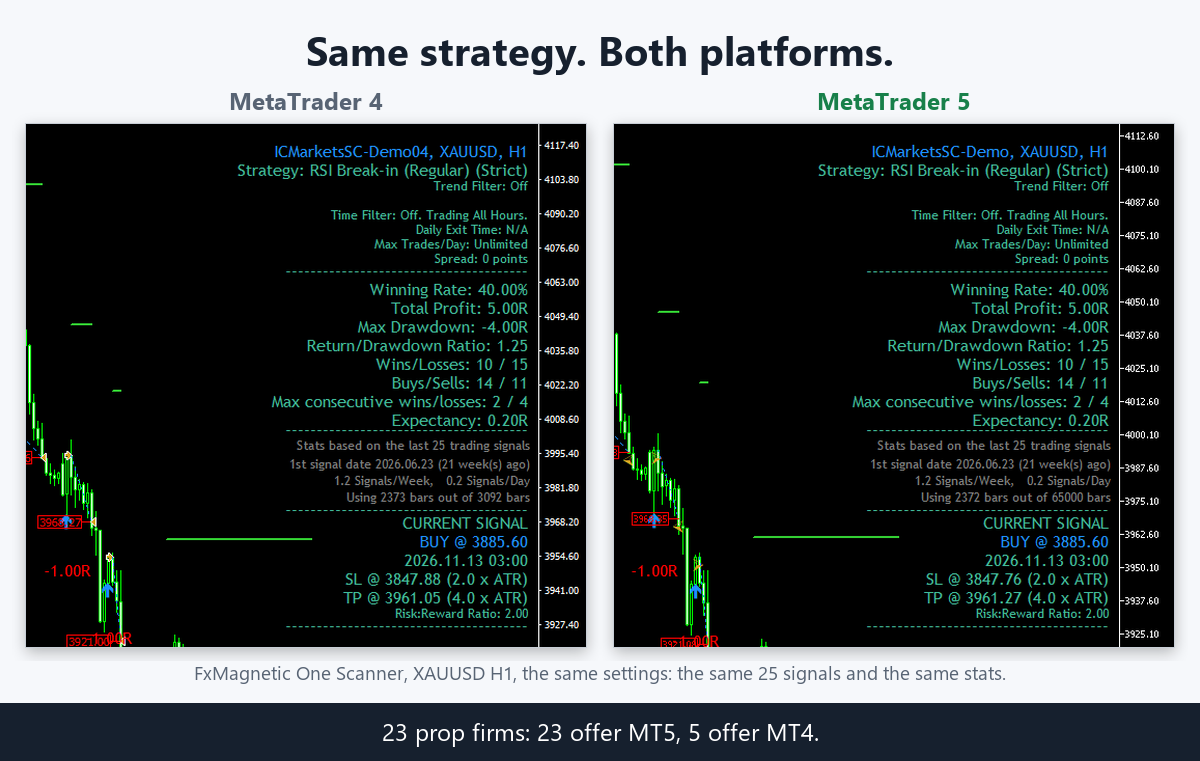
The problem: Your new prop-firm account comes as MT5, but your FxMagnetic strategies live on MT4. Of the 23 prop firms on my list, all 23 offer MT5. Only 5 still offer MT4.
Now in 3.0.2: Scanner, Autotrader, trade filters and Equity Simulator all run on MetaTrader 5, with the same licence key.
What changes for you: One tool for every account you trade. Your strategies go where the accounts are, and you stop trading good setups by hand because “it only runs on MT4”.
Reason 2 of 10
More markets
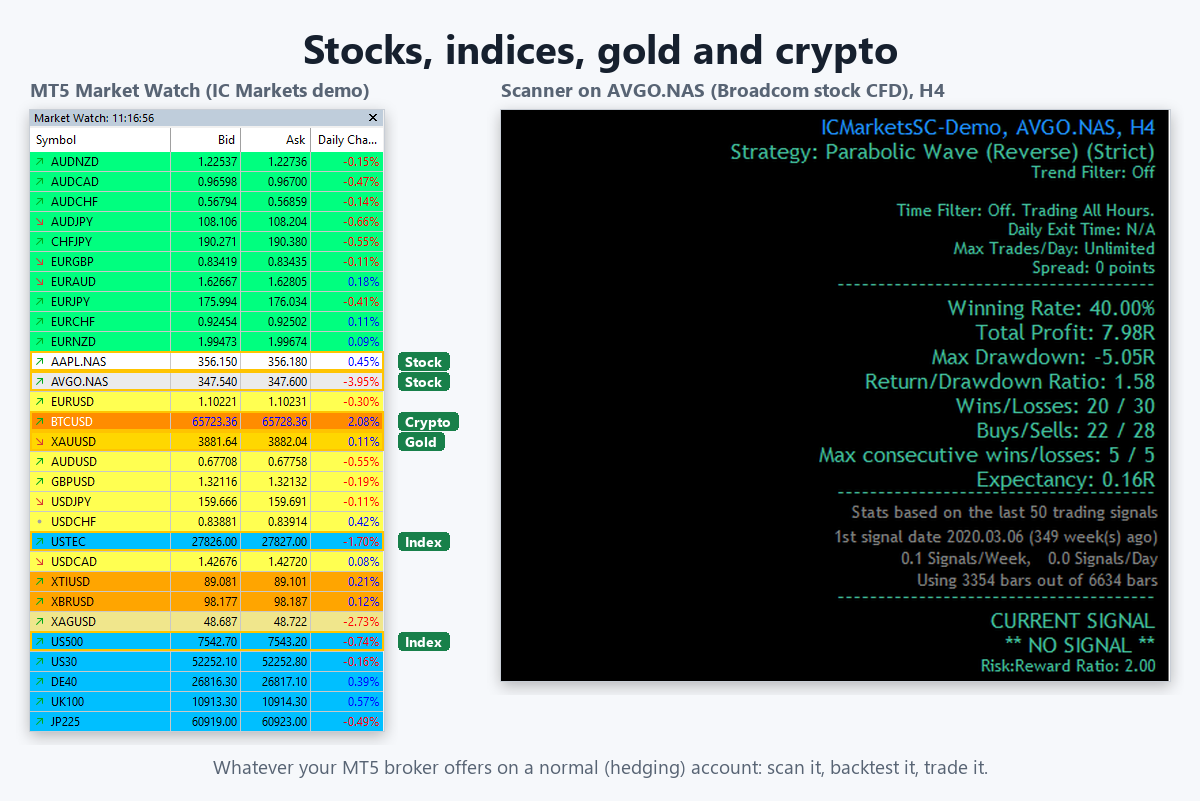
The problem: Your MT5 broker offers stocks, indices, gold, oil and crypto, but your strategy has only ever been tested on a few forex pairs.
Now in 3.0.2: FxMagnetic scans, backtests and trades whatever your MT5 broker offers on a normal (hedging) account. Risk-based lot sizes are calculated correctly for CFDs like gold and oil.
What changes for you: You find out where your strategy really works, maybe on gold or the NASDAQ rather than EURUSD, before you risk a cent.
Reason 3 of 10
More timeframes
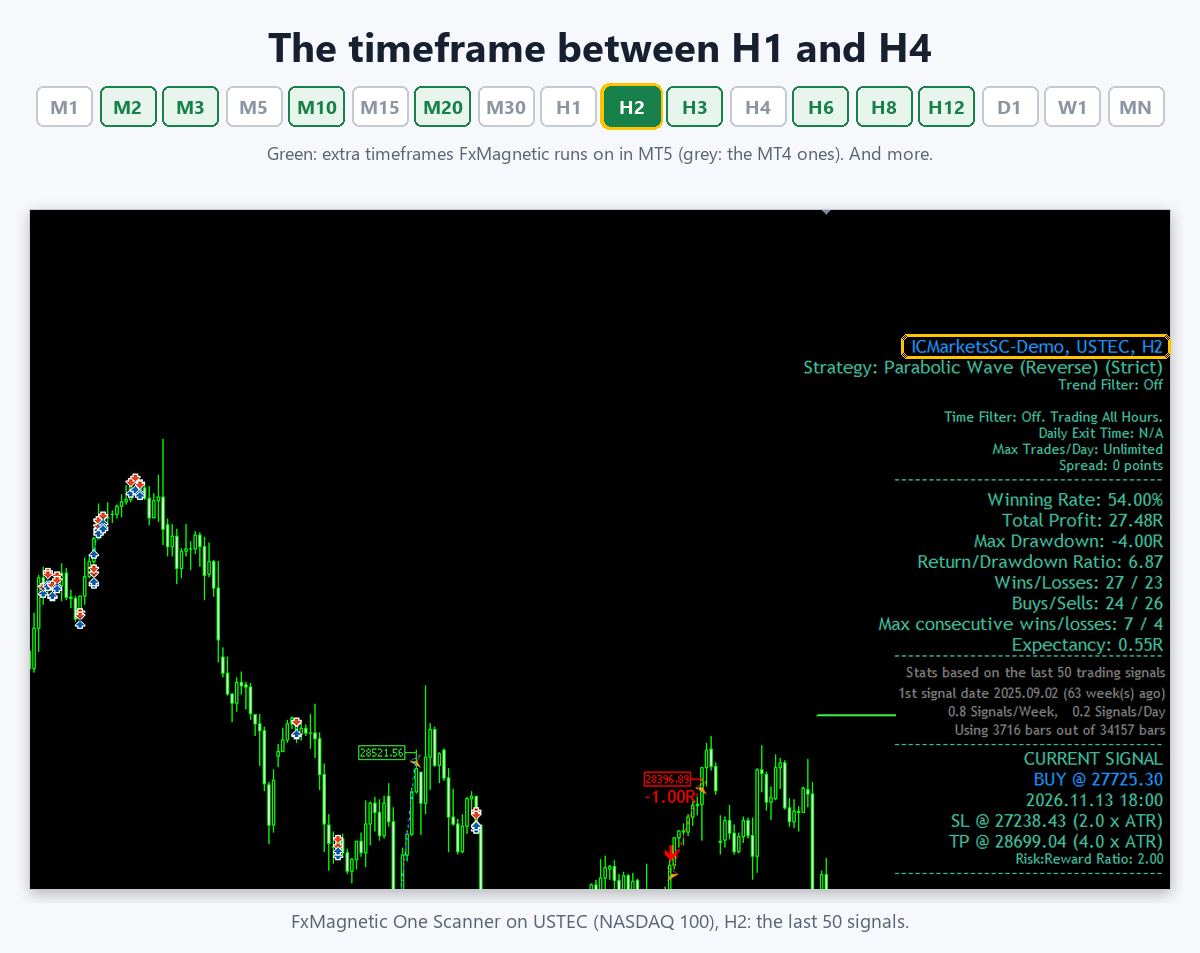
The problem: On H1 your strategy is too noisy. On H4 it hardly trades. There was nothing in between.
Now in 3.0.2: On MT5 you can run FxMagnetic on M2, M3, M10, M20, H2, H3, H6, H8, H12 and more.
What changes for you: More places to find the timeframe where your strategy fits. H2 is often the sweet spot between noise and too few trades.
Reason 4 of 10
Your MT4 strategies come with you
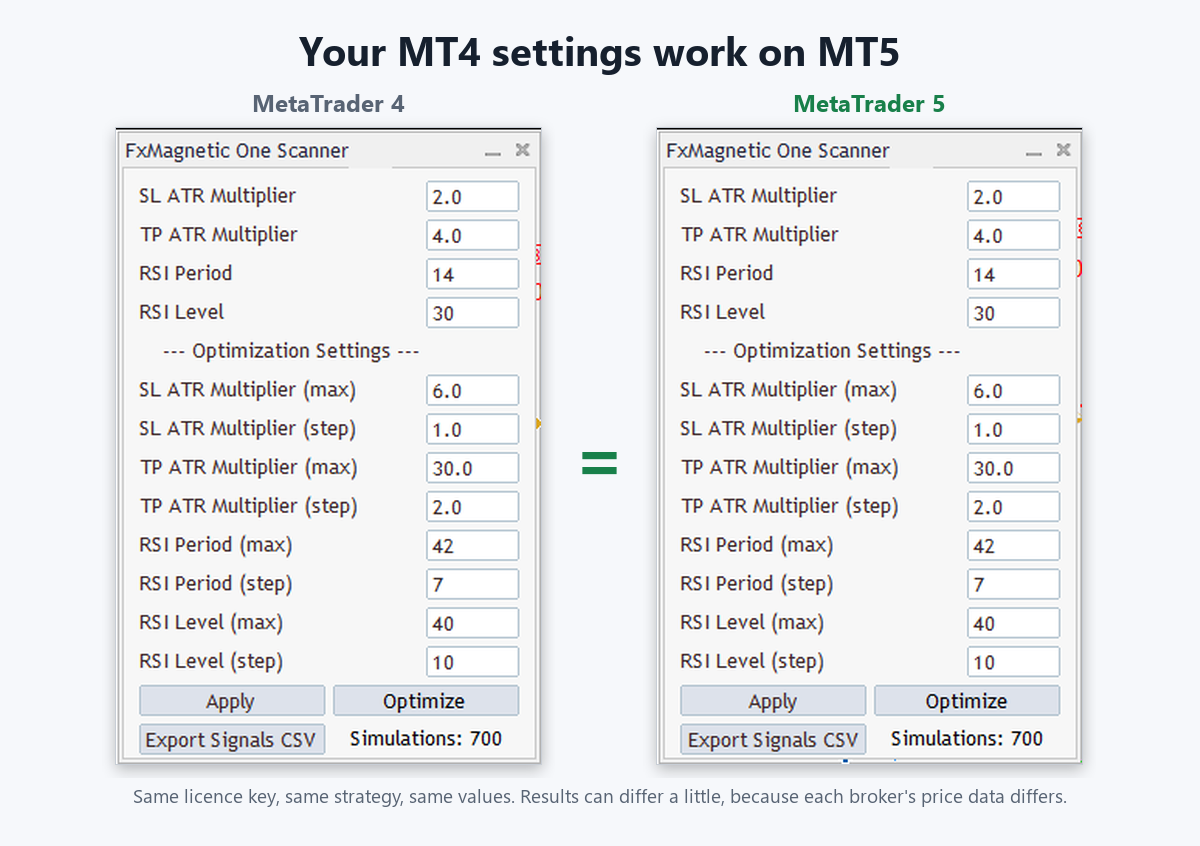
The problem: Moving to a new platform usually means rebuilding and re-testing everything, which takes weeks.
Now in 3.0.2: The same licence key and the same settings. A strategy you found on MT4 runs the same way on MT5. I ran 264 of my own example strategies on both platforms to check.
What changes for you: You move to MT5 in an afternoon, not a month. Results can differ a little, because each broker’s price data is different.
Reason 5 of 10
Set up a strategy without touching the mouse
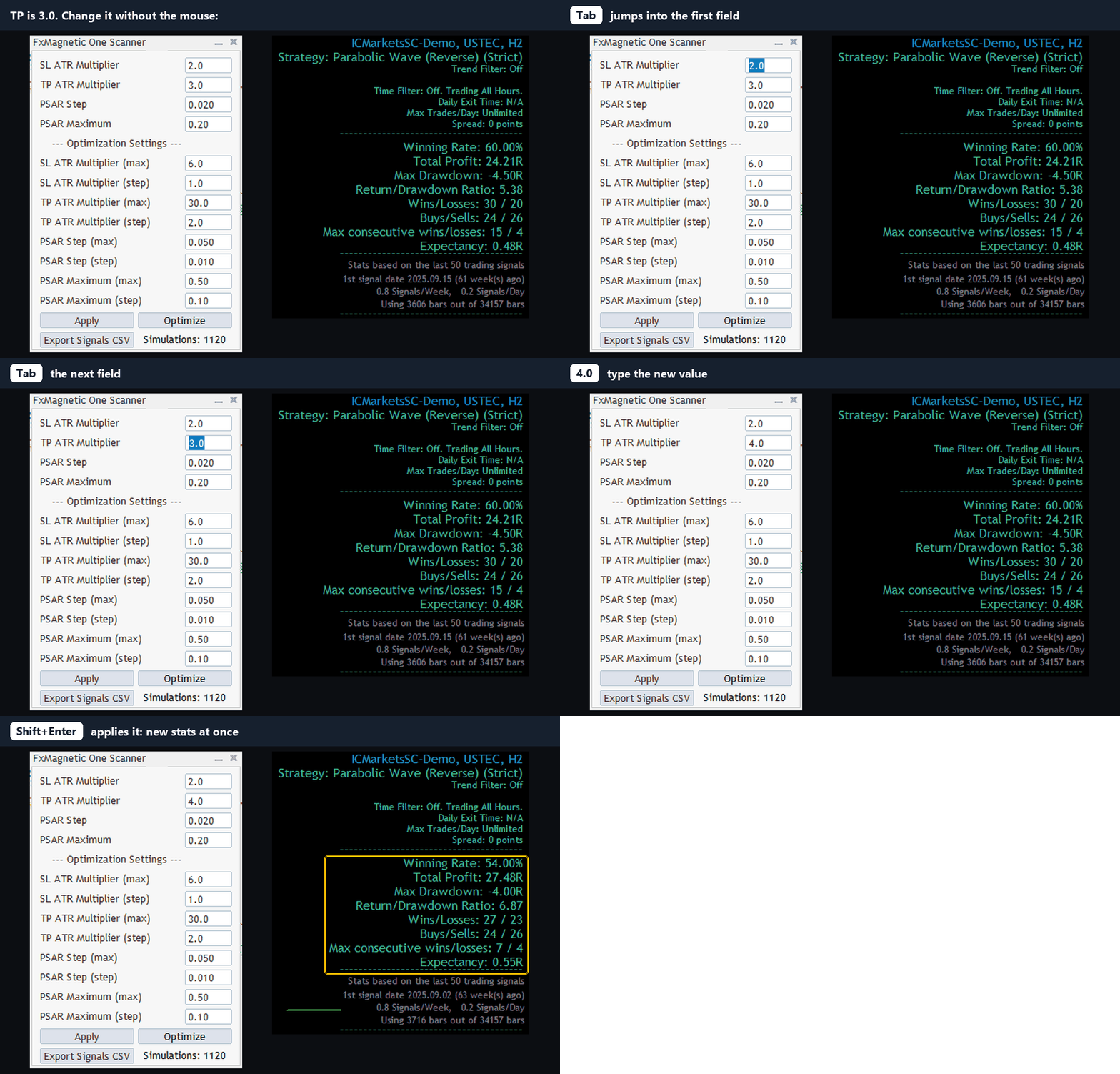
The problem: Testing 20 variations of a strategy meant clicking into every field, typing, and clicking Apply. Again and again.
Now in 3.0.2: Tab jumps to the next field, Shift+Tab goes back, Shift+Enter applies.
What changes for you: You test ideas as fast as you can type them. Ten variations take a minute, not ten.
Reason 6 of 10
Trading hours in New York or London time, all year
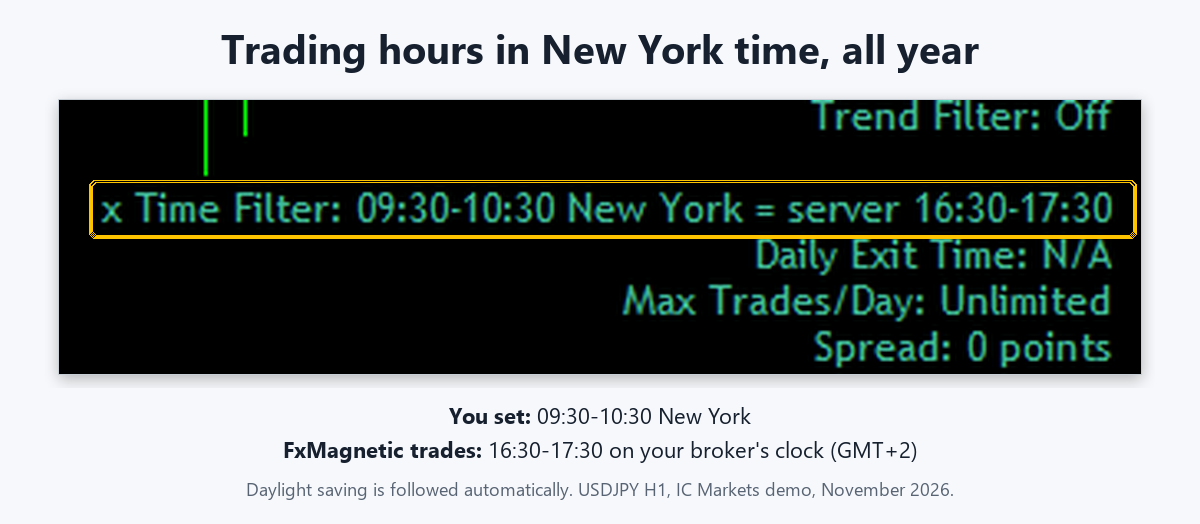
The problem: Your broker’s clock is GMT+2 or +3. Twice a year the US and Europe change their clocks on different dates. Suddenly your “first hour after the New York open” trades at the wrong hour, and the old DST switch only confused things.
Now in 3.0.2: Choose the clock you think in: New York, London, Frankfurt, Tokyo, Sydney, Hong Kong / Singapore, UTC or your broker’s time. Daylight saving is followed automatically, and the panel shows both clocks. The New York opening range, the London breakout and the session levels read your broker’s clock on their own, in backtests too.
What changes for you: Set it once and it’s right all year, on any broker. No more spring and autumn surprises.
Reason 7 of 10
Price history downloads by itself
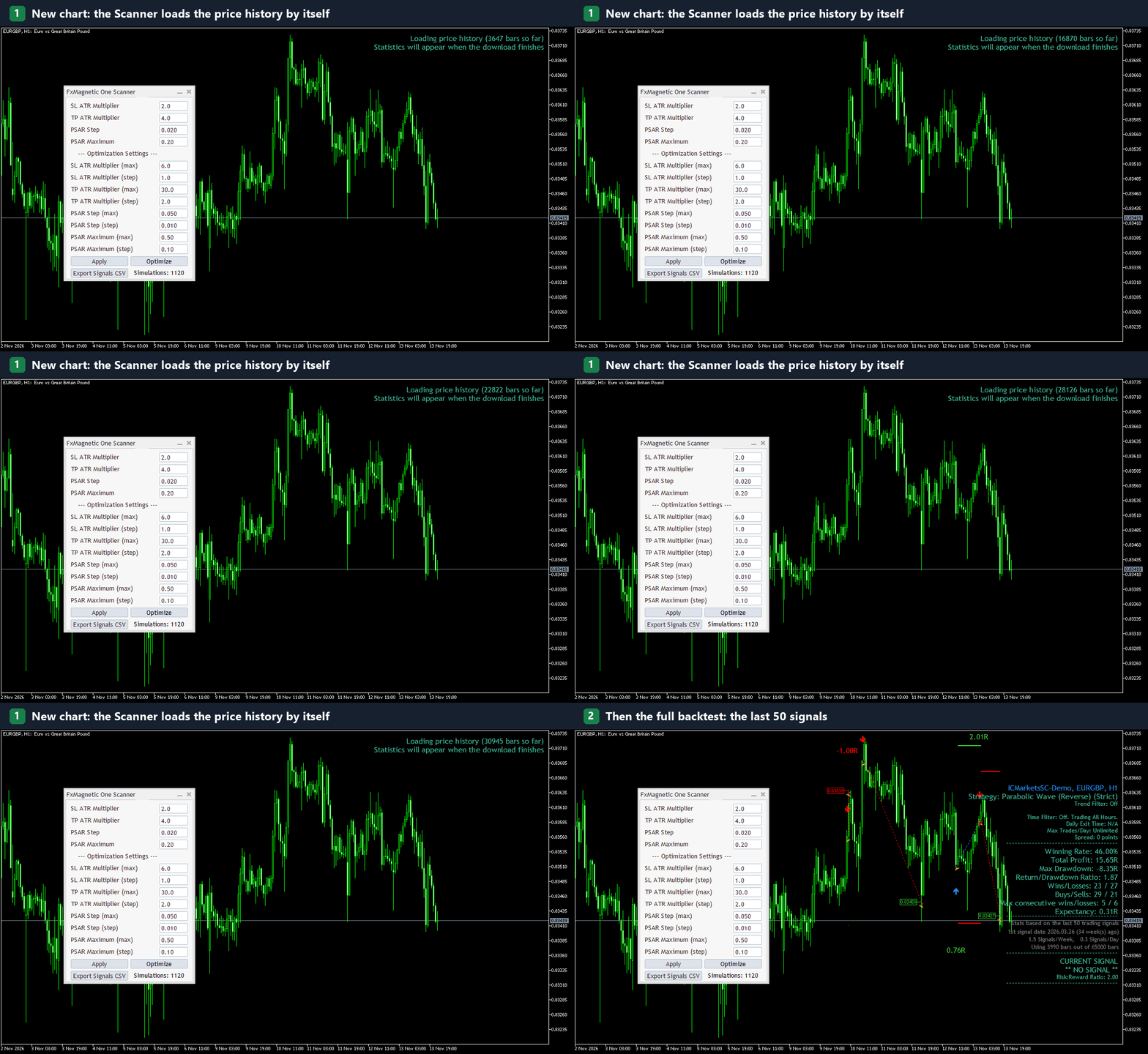
The problem: You open a new symbol and the backtest shows only a few weeks, because MT4 hadn’t loaded the history yet. You scrolled back or pressed Home and waited.
Now in 3.0.2: The Scanner loads the full price history by itself (“Loading price history…”) and then shows the complete results.
What changes for you: Open a chart and get a full backtest. No half-empty stats that make a strategy look better or worse than it is.
Reason 8 of 10
Backtest on 200 signals
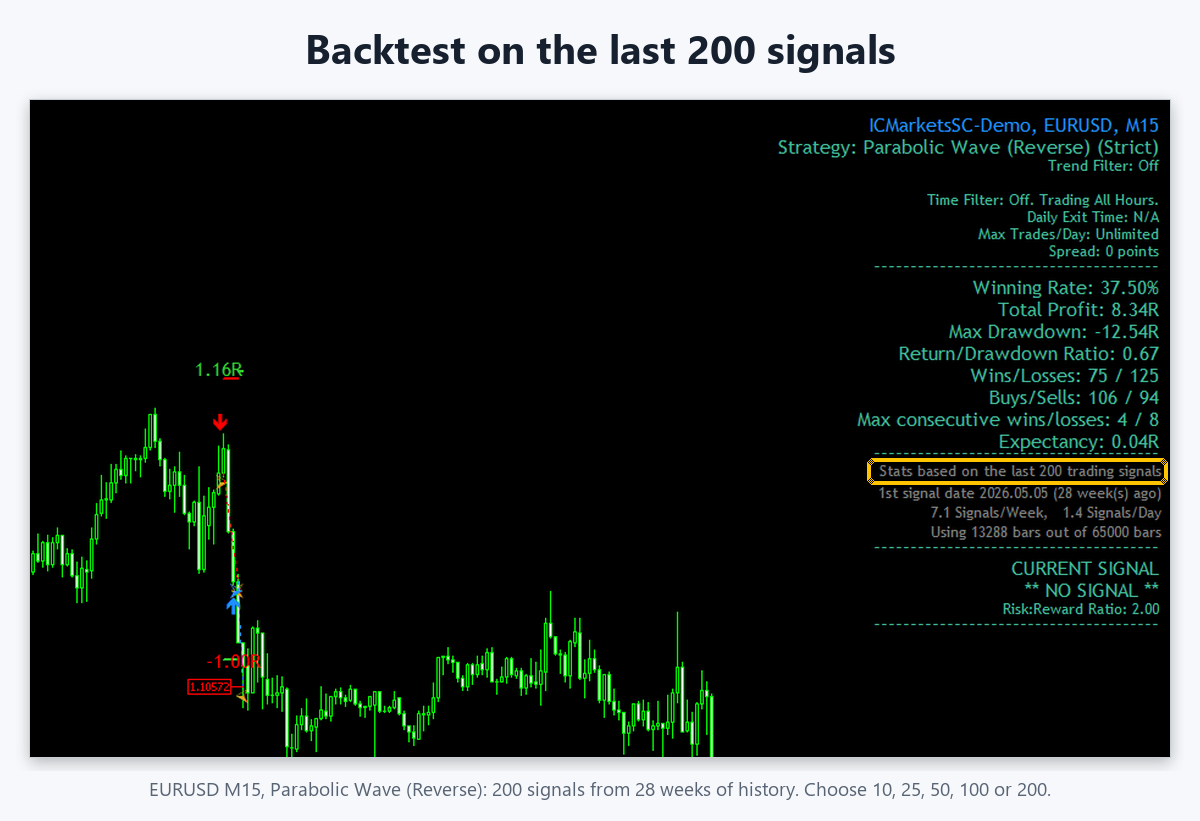
The problem: 50 trades can be luck. You want to see more before you trust a strategy with real money.
Now in 3.0.2: Choose 200 signals (or 10, 25, 50, 100). Many of you asked for this.
What changes for you: More history behind every decision. If a strategy still looks good over 200 signals, you can trust it more.
Reason 9 of 10
Safer trade handling, built for prop firms
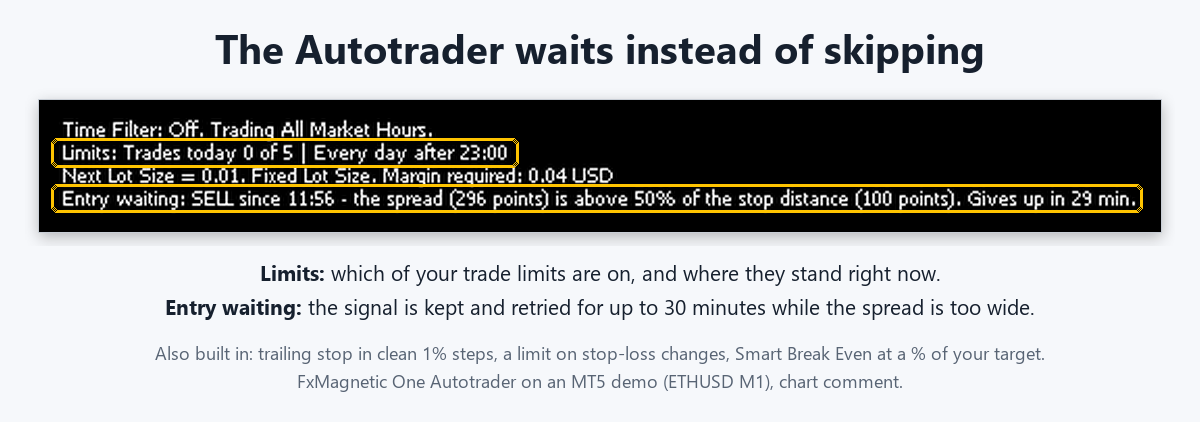
The problem: The best signal comes just after midnight, when the spread is huge, and the trade is skipped. A stop loss that moves on every tick sends hundreds of order changes, and many prop firms and brokers can suspend an account for that.
Now in 3.0.2: The Autotrader waits up to 30 minutes for a normal spread instead of skipping the trade. The trailing stop moves in clean 1% steps, and a built-in limit keeps stop-loss changes few and far apart. Smart Break Even can start at a percentage of your target.
What changes for you: You can leave it running on a challenge account without babysitting the rollover or worrying about order-change limits.
Reason 10 of 10
A panel that explains itself
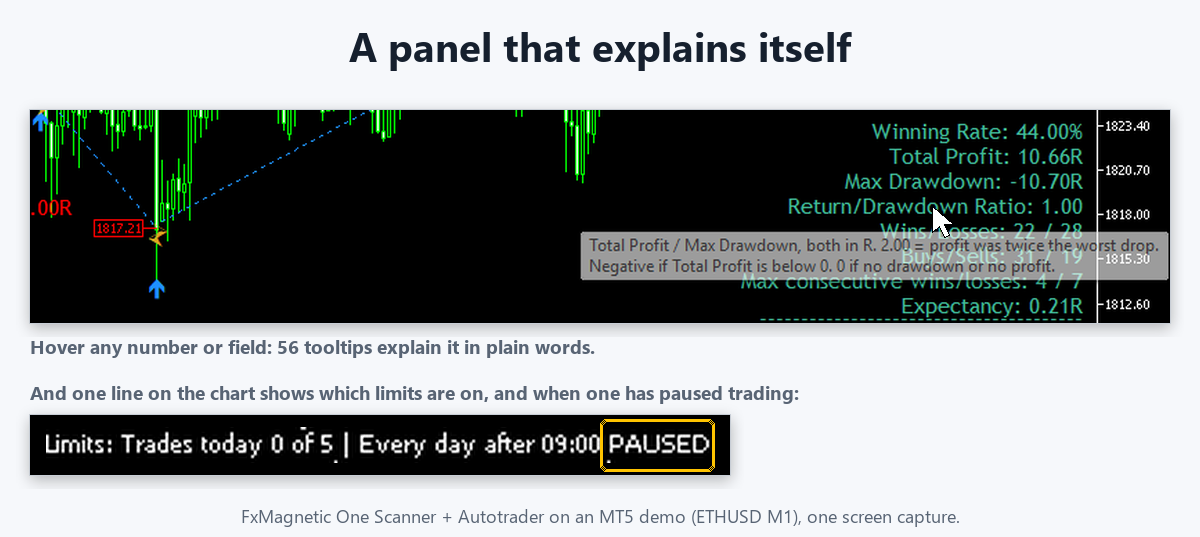
The problem: “What does Return-to-Drawdown mean? Why did the Autotrader stop trading today?” You had to search the manual or email support.
Now in 3.0.2: Hover any number or field for a plain explanation (56 tooltips). One line on the chart shows which of your limits are on and whether one has paused trading.
What changes for you: You learn while you use it, and you see at a glance why the EA is waiting.
Plus many more fixes and improvements. The full list goes into the changelog on release day.
I flipped my own strategy
A few weeks ago I took a NAS100 New York-session breakout strategy that wasn’t working, and flipped it: every buy became a sell. Same entries, opposite direction, plus one trade-management rule after the first target. 12 trading days later the $50,000 prop account was up 11.63%, with 80% winning trades. In FxMagnetic, flipping a strategy is one setting: Reverse mode.
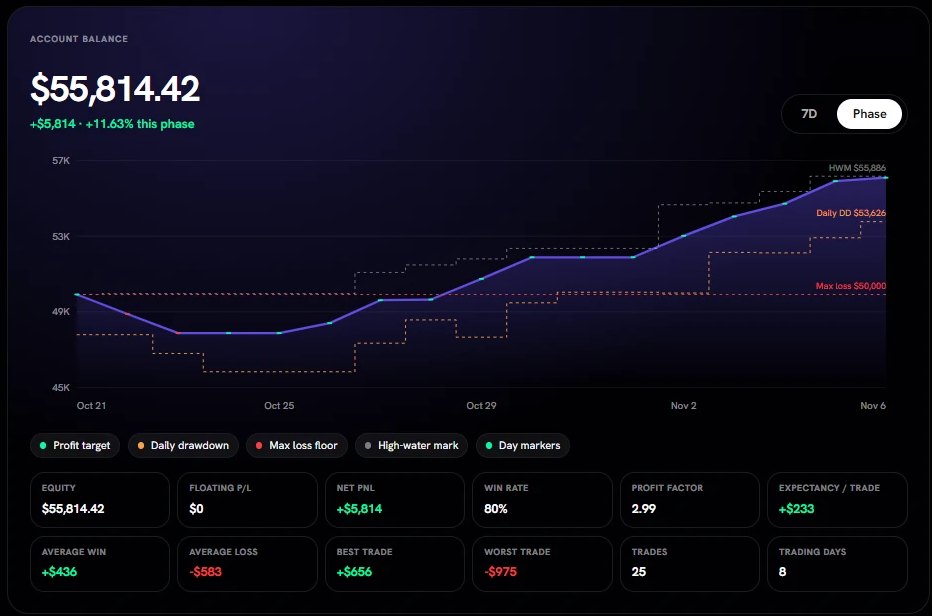
One account, one strategy, a few weeks. Past results don’t guarantee future results.
Why lifetime owners pay once, and subscribers don’t pay extra
Some of you asked why subscribers get MT5 included. The simple answer: they pay for it every year, for every app.
| Subscriber, €290/year per app | Lifetime owner, MT5 pre-order | |
|---|---|---|
| Apps on MT5 | Only the apps they pay for, each one €290/year | Every FxMagnetic app you own |
| Paid after 1 year | €290 per app | €199, once |
| Paid after 3 years | €870 per app | €199, once |
| If they stop paying | MT4 and MT5 both stop working | MT4 and MT5 keep working forever |
Your lifetime licence keeps working forever, on MT4 and, with this upgrade, on MT5. That’s why it’s one price, however many apps you own.
What you get
- The MT5 version of every FxMagnetic app you own: Scanners, Autotraders, trade filters and the Equity Simulator
- FxMagnetic 3.0.2 for MT4 as well
- Your current licence key works on MT5: nothing new to enter
- 30-day money-back guarantee (conditions apply)
€199 once · 80% below the €995 price after the pre-sale
How it works
Step 1
Order now
Pay once at the pre-sale price. You get an order confirmation by email.
Step 2
Monday 23 November
You get an email with the MT5 download links for your apps.
Step 3
Install and trade
Use your current licence key. Step-by-step guide: How to install FxMagnetic on MT5.
Questions
Do I need a new licence key?
No. Your current key works on MT5.
I own 10 apps. Is it still €199?
Yes. One payment covers every FxMagnetic app you own.
I’m a subscriber. Do I pay?
No. MT5 is included for the apps you subscribe to.
Will my MT4 apps keep working?
Yes, forever. Nothing changes on MT4 if you don’t upgrade.
Can I run MT4 and MT5 at the same time?
Yes. The MT5 version uses the same licence key. Computers are counted per machine, not per platform, so MT4 and MT5 on the same PC or VPS count as one computer.
What happens after Monday 30 November?
The upgrade costs €995.
When do I get it?
On Monday 23 November. Pre-sale orders are delivered first.
Does it work on prop-firm MT5 accounts?
Yes, on any MT5 account where your firm allows EAs and indicators. Check your firm’s rules.
Hedging or netting account?
The Autotrader needs a hedging account, which is what most forex and CFD brokers and prop firms give you. Netting accounts (common for exchange futures and stocks) are planned for a later update. The Scanner works on both.
Refunds?
FxMagnetic comes with a 30-day money-back guarantee. To qualify, you show your trading history as proof that you followed the strategies and didn’t get realistic results. The full conditions are in our Terms and refund policy.
The pre-sale ends Monday 30 November at midnight (CET)
€199 once for MT5 of every FxMagnetic app you own. After that, €995.
Rimantas
P.S. Every FxMagnetic strategy comes in Regular and Reverse mode. If one of your strategies keeps being wrong, test the opposite before you delete it.